Mouse Tweaks versions and installation
Mouse Tweaks by YaLTeR changes mouse gestures inside supported inventory screens. It helps gather matching stacks and transfer items with less repeated clicking. Custom mod interfaces can behave differently; start with an ordinary chest.
This guide covers Minecraft Java 1.21.1: use Mouse Tweaks 2.26 for Fabric or Forge, and 2.26.1 for NeoForge. The NeoForge update fixes a configuration-screen crash; Fabric and Forge did not need it. These loader-specific JARs are separate downloads.
Use Java 21 and the loader profile matching 1.21.1. Close the game, put the correct JAR in that instance's mods folder and remove duplicate older copies. Fabric requires a compatible Fabric API; Mod Menu is optional for opening its settings screen. No extra configuration library is needed. Follow a modpack's supplied versions when updating.
Mouse Tweaks is client-side, with no server installation needed. Check a multiplayer server's mod rules before using it there.
Drag gestures: deposit, gather and transfer
The pinned implementation distinguishes how the gesture starts:
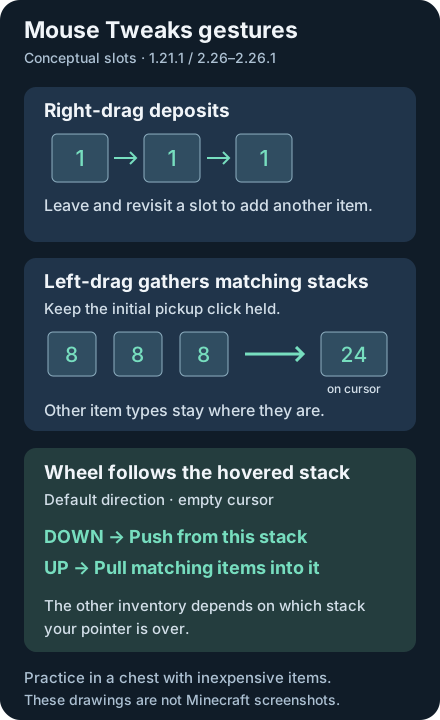
- Right-drag deposits: pick up a stack, then hold right mouse while moving through compatible slots. Each entry deposits one item. Leave and revisit a slot to add another; simply hovering does not keep depositing.
- Left-drag gathers: with an empty cursor, press and keep holding left mouse on a stack, then sweep over matching stacks. The original pickup press must remain held. Picking up, releasing and clicking again while carrying items starts ordinary distribution behavior.
- Shift-drag moves everything touched: with an empty cursor, hold Shift first, then hold left mouse while sweeping across occupied slots. Each stack uses the container's normal quick-move behavior.
- Filtered transfer: begin the held left-click pickup, then add Shift while sweeping over matching stacks. The cursor stack supplies the filter; put it down afterward.
Collection respects item components and stack limits. If an encountered stack would not fit entirely on the cursor, this build skips it. Use the physical Shift key for transfer gestures, even if you rebound Sneak.
Practice safely in an ordinary chest
Use a test world and inexpensive items. Make three cobblestone stacks of eight, plus some dirt, keeping valuables outside the exercise.
- Open the chest. With an empty cursor, hold left-click on the first cobblestone stack and sweep over the other two. Expect 24 cobblestone on the cursor; dirt stays where it was.
- Put everything down. Pick up eight cobblestone and right-drag through three empty slots. Revisit those slots to add another item to each.
- Put down the remaining cursor items. Hold Shift first and left-drag over the practice stacks to quick-move them.
- Leave some matching cobblestone in both inventories, then test one wheel notch at a time as described below.
Try modded containers only after the gestures make sense in a chest. Crafting output slots have special behavior and can move a complete recipe batch when scrolling; keep them out of this first exercise.
Wheel direction and useful settings
With an empty cursor, hover a nonempty stack. By default, scroll down pushes items from that stack into the other inventory; scroll up pulls matching items into it. Direction is relative to the hovered stack. Down over a player stack sends toward the chest; down over a chest stack sends toward the player.
Ordinary wheel input moves one item per notch, while accelerated events can move more. Empty hovered slots cannot choose an item type to pull. Shift+wheel is not a separate full-stack shortcut in these builds.
Settings live in the active instance's config/MouseTweaks.cfg. The release defaults enable RMBTweak, LMBTweakWithItem, LMBTweakWithoutItem and WheelTweak; set a feature to 0 to disable it.
WheelScrollDirection=0 is the default above; 1 reverses it. Values 2 and 3 use inventory position, with 3 inverted. ScrollItemScaling=1, labelled macOS compatibility in the UI, normalizes each nonzero event to one item unit. Several events can still occur during one gesture. Close the game before manual edits, keeping a copy of the original configuration.
When a gesture does not work
For failed scrolling, empty the cursor and check the hovered stack, matching source items and destination space. Confirm WheelTweak is enabled. For left-drag, restart with an empty cursor and keep the initial pickup press held.
If a gesture works in a chest but fails in a storage terminal, the custom screen may be unsupported or opt out. Avoid assuming every modded GUI works. Test overlapping input features from sorting mods one at a time to isolate double actions.
On NeoForge, a settings-screen crash with 2.26 is addressed by 2.26.1. For persistent problems, verify the active instance and loader-specific JAR, then report exact versions and reproduction steps to the official issue tracker.
Mouse Tweaks FAQ
Does Mouse Tweaks need to be installed on the server?
No. These builds run on the client. The server still controls inventory behavior, and its rules determine which client mods are allowed.
Why does left-drag spread items instead of collecting them?
Begin with an empty cursor and keep the first left-click held after picking up the stack. Releasing it and clicking again while carrying items starts distribution behavior.
How do I reverse Mouse Tweaks scrolling?
In config/MouseTweaks.cfg, WheelScrollDirection=0 is default down-push/up-pull relative to the hovered stack. Set it to 1 to reverse that behavior.
Does Mouse Tweaks work in every modded inventory?
No. Custom screens can be unsupported or disable particular gestures. Compare with an ordinary chest and isolate overlapping inventory-input features before reporting a bug.