
Jade version and installation
Jade by Snownee puts information about the block or entity you are looking at into an on-screen overlay. Start with its name and owning mod, then use the available details to check a crop or inspect a machine.
This guide covers Minecraft Java 1.21.1 and Jade 15.10.6. Choose the separate Fabric release or NeoForge release. The project's Forge builds belong to other Minecraft versions. Use Java 21 and a loader profile for 1.21.1. The Fabric download also lists Quilt compatibility; this walkthrough uses Fabric or NeoForge.
Close Minecraft and place the matching JAR in the active instance's mods folder, removing an older duplicate Jade JAR. On Fabric, also install a 1.21.1-compatible Fabric API; Jade's manifest requires API 0.99 or newer. NeoForge needs no separate configuration library. Keep an established pack's supplied versions unless its maintainer recommends changing them. Back up the instance before updates and begin in a test world.
First inspection and default controls
Aim at a nearby block and read its identity. Look at planted wheat: the percentage represents its current growth stage, and a fully grown plant shows Mature. It does not estimate time until harvest. A passive mob can show health information.
These are the 15.10.6 default bindings:
| Action | Default |
|---|---|
| Open configuration | Numeric keypad 0 |
| Show Overlay | Numeric keypad 1 |
| Toggle Fluid | Numeric keypad 2 |
| Show Recipes / Show Uses | Numeric keypad 3 / 4, with JEI |
| Narrate target | Numeric keypad 5 |
Keypad keys differ from the number row. Without a keypad, rebind Jade under Minecraft's Controls → Key Binds, or enter the client command /jadec config.
Hold Show Details for expanded information: Left Shift on NeoForge; Fabric accepts Shift and offers an initially unbound alternative binding. Put a few distinguishable stacks in a test chest, look at it normally, then hold Show Details. The default inventory preview limits are nine entries normally and 54 with details; providers can aggregate items, so these are not guaranteed slot counts.
Why some details need server-side Jade
The official project description distinguishes basic client information from data that needs Jade on the server. Item storage, brewing fuel and bees inside beehives need server support. A honey-level line can appear without a bee count because honey level is available from the block state.
Single-player worlds include an integrated server. In multiplayer, ask the operator whether matching Jade and the relevant mod integration are installed and enabled. Changing your overlay's appearance cannot supply missing server data.
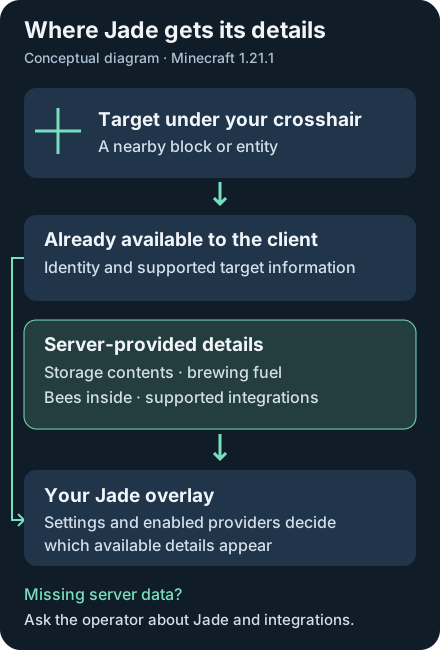
Storage previews also respect restrictions. Jade's inventory provider avoids revealing ungenerated loot-table contents and handles locked inventories. A machine needs a suitable provider to expose its internals. Treat a missing line as a compatibility or permission question before assuming the whole mod is broken.
Make the overlay readable
Open configuration and choose Mod Settings → Appearance. Use Overlay Position → Adjust to move the HUD, then tune Display Scale or Background Opacity against the world behind it. Themes change its appearance. Check one change in-world before adjusting another.
Display Mode controls visibility: Toggle switches with Show Overlay; Hold requires holding that action; Lite keeps the display simpler until Show Details is held. Plugin Settings controls individual information providers. These labels come from the release configuration UI.
Harvest-tool icons suggest tools for the block; the check/cross indicates whether your held tool is correct for drops. Neither guarantees a particular Fortune or Silk Touch result. Harvest information is disabled in Creative and Spectator by default, so use Survival when checking those indicators.
Missing overlay, previews or recipe keys
- Nothing appears: confirm the launched instance, matching loader JAR and required dependency. Check Enabled, the Show Overlay binding and Display Blocks/Entities. Close inventories or other screens, where the overlay is normally hidden, and test a plain nearby block.
- Names appear but contents do not: check server support, Plugin Settings and Show Details. Server-controlled options can limit the information available.
- Water changes the target: inspect Display Fluids or the Toggle Fluid binding. Fallback displays fluid when there is no other target.
- Recipe shortcuts are absent: these bindings require the supported JEI integration. Check installed versions and key conflicts; Jade does not supply its own recipe database.
For a crash, reproduce in a backed-up test instance and report exact Minecraft, loader and Jade versions to the official issue tracker. Review logs for private information before sharing them.
Jade FAQ
Does Jade need to be installed on the server?
Basic client information works without it, but details such as storage contents, brewing fuel and bees inside need server-side Jade and enabled support. A single-player world already includes an integrated server.
How do I open Jade settings without a numpad?
Rebind Open Config in Minecraft Controls → Key Binds, or use /jadec config. The default keypad 0 is different from the number-row 0.
Why is Jade not showing chest contents?
Check server-side Jade, Plugin Settings and Show Details. Loot-table or locked-container restrictions and missing integrations can also prevent a preview.
Does Jade crop percentage show time remaining?
No. It reflects the current growth stage relative to the maximum stage. A fully grown crop is labelled Mature.