
What is EMI?
EMI is an item and recipe viewer with a recipe tree for planning multi-step crafts. It calculates material costs for the recipes you choose and tracks progress from your inventory.
This guide covers EMI 1.1.24 for Minecraft 1.21.1, using the official Fabric/Quilt release or NeoForge release. Match the file to your instance's loader; the project's older Forge releases have different Minecraft targets.
Install EMI and Find Your First Recipe
Place the matching EMI JAR in the instance's mods folder and launch that modded instance. Fabric also needs Fabric API for 1.21.1, as required by EMI's mod metadata. The Fabric download also lists Quilt compatibility; follow the corresponding loader/API setup for that instance.
Open your inventory and type an item name into EMI's search bar. Hover an item and press R to see recipes or U to see its uses. A favorites the hovered item for quick access later. Check EMI's config screen under Binds if your pack changes these defaults.
Build and Adjust a Recipe Tree
Open a recipe and click View Recipe Tree beside it. Left-click an ingredient node to choose its recipe for this tree. The Set as default recipe button saves a preference for future trees. Right-clicking a recipe node folds that branch temporarily; Shift-right-click clears its assigned recipe.
Base materials depend on recipe defaults. EMI normally stops at iron ingots, for example, even though a furnace can produce them. A modpack can change those choices. Expand a material yourself when you want to include another processing step. The official recipe-defaults guide explains this boundary.
For practice, plan one hopper with unchanged vanilla recipes. It needs five iron ingots and one chest. Choose oak planks for the chest's eight planks, then the oak-log recipe: two logs supply those planks. This plan ends at five ingots and two logs; obtaining the ingots remains your job.
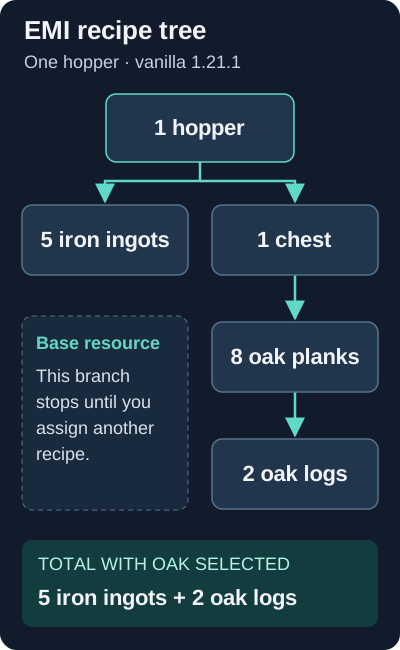
Original diagram of vanilla 1.21.1 recipe quantities with oak selected. Pack recipes and saved defaults can change the tree.
Scale the Plan and Craft Its Steps
Scroll over the tree's batch count to increase the requested crafts. Check Total Cost and any Leftovers, especially when a recipe produces several items per craft.
Toggle crafting mode beside Total Cost. EMI compares the plan with your inventory and adds temporary synthetic favorites for unfinished steps to the favorites sidebar. These help you work through a plan; the tree implementation tracks quantities already held.
Open the required workstation before using Fill Recipe. Ingredient transfer depends on the current screen's recipe support and available materials. For the hopper example, use a crafting table for the chest and hopper. EMI does not build machines or collect materials for you.
Missing Recipes, Hidden Sidebars and JEI
If EMI disappears, try its default Ctrl+O visibility toggle while an inventory is open. For failed lookups, clear the search and check the Binds settings for conflicts. Hover an unavailable fill button: its explanation can identify missing ingredients, a small crafting grid or an unsupported workstation. Follow any server-support message for that particular transfer.
For mods exposing recipes through JEI, install a matching JEI build alongside EMI. The official EMI project page documents recipe sharing and hides JEI's interface. JEI is optional for EMI itself; keep it when your pack's integrations need it. A missing mod recipe still needs working integration, so report the affected recipe and exact mod versions if it remains absent.
Use Jade alongside the recipe viewer when you need to identify a machine in the world before looking up its recipes.
EMI FAQ
Does EMI need JEI installed?
EMI works independently. Install a matching JEI build alongside it when a mod needs JEI recipe integration; EMI shares those recipes and hides the JEI interface.
Why does my EMI recipe tree stop at iron ingots?
EMI treats iron ingots as a base resource in its default setup. Assign a recipe to that node when you want the tree to include the processing step. Modpacks can supply different defaults.
Does pressing A craft an item in EMI?
A is the default Favorite binding. Use Fill Recipe or the configured crafting bindings with a supported workstation and the required ingredients.